
Resurrecting ColdFusion: How to Modernize Legacy Apps Without Rewriting From Scratch
Resurrecting ColdFusion: How to Modernize Legacy Apps Without Rewriting From Scratch
Still running your business on an old ColdFusion application?
You’re not alone—and there’s a smart way forward.
If your business still relies on a ColdFusion application built years—or even decades—ago, you’re not alone. Many organizations depend on legacy ColdFusion systems that still work—but are increasingly difficult to maintain, update, or secure in today’s fast-paced digital world.
The good news? You don’t have to start from scratch. ColdFusion app modernization lets you unlock new features, improve security, and boost performance—without the high costs and long timelines of a full rebuild.
In this article, we’ll walk through how to modernize legacy ColdFusion applications using proven strategies that save time, reduce risk, and protect your existing investment.
Why Businesses Still Use Legacy ColdFusion Apps
ColdFusion’s speed, simplicity, and seamless database integration made it a popular choice for enterprise web applications in the late 1990s and early 2000s. Even today, many businesses continue to rely on legacy ColdFusion apps for mission-critical operations.
But as technology evolves, these once-reliable systems begin to show their age:
-
Security vulnerabilities that put your business at risk
-
Performance bottlenecks and outdated code
-
Difficulty finding experienced ColdFusion developers
-
Clunky user interfaces and poor mobile responsiveness
Still, a full rebuild is often risky, time-consuming, and expensive—especially when your ColdFusion app holds years of custom business logic and has already cost tens of thousands of dollars to develop.
Modernizing Without a Full Rebuild
Rather than tearing everything down, a phased ColdFusion modernization lets you preserve what works and improve what doesn’t. Here’s how:
1. Start with a Comprehensive ColdFusion Code Audit
Before making changes, get a clear picture of your app’s health. A professional ColdFusion code audit identifies:
-
Deprecated functions and unsupported features
-
Security vulnerabilities and compliance risks
-
Performance optimization opportunities
-
Integration points with other systems and APIs
This audit forms the blueprint for a successful modernization strategy.
2. Upgrade to a Modern ColdFusion Version
Upgrading to ColdFusion 2025 unlocks powerful features:
-
Improved performance, scalability, and stability
-
Native support for containerization (Docker)
-
Enhanced API management and security tools
-
Modern language features (closures, async programming, RESTful services)
Upgrading is often the most cost-effective first step in modernizing your ColdFusion application.
3. Refactor in Phases for Maximum Impact
Avoid the risks of a full rewrite by modernizing in stages:
-
Move legacy logic into ColdFusion Components (CFCs) for better structure
-
Modularize code for easier maintenance and scalability
-
Gradually replace outdated front-end code with modern JavaScript frameworks (like React, Vue, or Alpine.js)
This phased approach minimizes downtime, reduces risk, and delivers quick wins.
4. Enhance Your User Interface Without Rebuilding the Backend
Many legacy ColdFusion applications have strong backend logic but outdated front ends. You can:
-
Keep your existing ColdFusion backend
-
Upgrade your UI with modern front-end frameworks (React, Vue, Tailwind CSS)
-
Make your application mobile-responsive and user-friendly
-
Improve user experience without a complete rewrite
5. Add Accessibility Features for Compliance and Inclusivity
Accessibility is no longer optional—it’s essential for SEO, legal compliance, and user engagement. Tools like UserWay’s accessibility widget can quickly bring your app up to WCAG standards, making it more inclusive without major redevelopment.
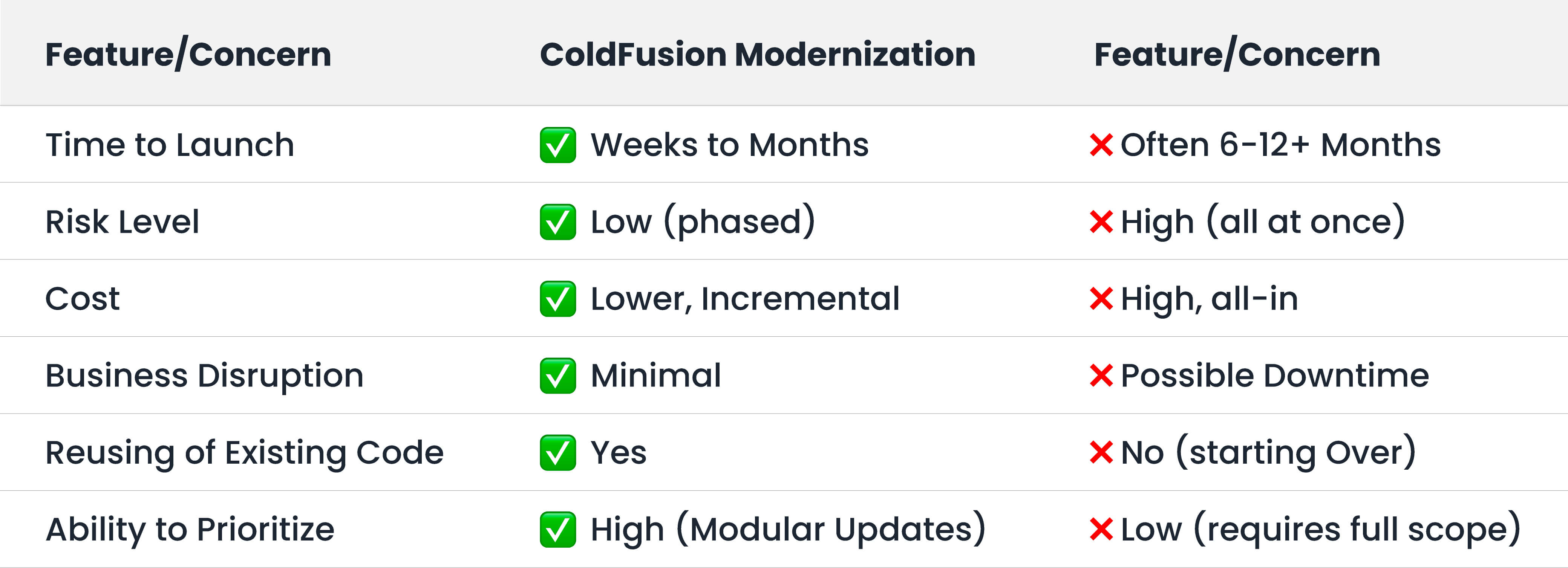
Why Not Just Rebuild Your ColdFusion App?
A complete rebuild might sound appealing—until you consider the full cost:
-
Time to market: A full rewrite can take months (or even years).
-
Risk: You risk losing critical business logic embedded in your legacy code.
-
Budget: Development costs for a rebuild are significantly higher than a phased modernization.
-
Protect your investment: Avoid throwing away the time, money, and expertise already invested in your existing ColdFusion application.
Final Thoughts: Don’t Bury a Good App—Modernize It
Legacy ColdFusion applications still have a lot of value to offer. With the right modernization strategy, you can:
-
Improve performance and scalability
-
Boost security and compliance
-
Enhance user experience and accessibility
-
Extend your app’s lifespan—without a costly rebuild
At WRIS Web Services, we’ve been supporting ColdFusion development since the floppy era. Whether you need a code audit, an upgrade, or a phased modernization plan, we’ll meet your app where it is—and help take it where it needs to go.
.Let’s talk ColdFusion. Request a free legacy app consultation today and see how we can help.
Get In Touch Today!Related Blogs
Before Google: The Wild West of Early Search Engines

WRIS at Adobe ColdFusion Summit 2026: Innovation, AI, and Community
.jpg&w=640&h=360&c=center)
What ADA Compliance Actually Means for Your Website in 2026
.jpg&w=640&h=360&c=center)
